
So the update is done; we can try it. The program was made in Unity, and as we can see, its default presentation is a fullscreen application. Only one instance can run at a time, with only one map open inside it. That makes copying and pasting, copying from a reference, and many other things harder. For the latter, of course, we can view an exported map on another screen, or import the exported image into the "background" and draw on top of it, but it is not quite the same.
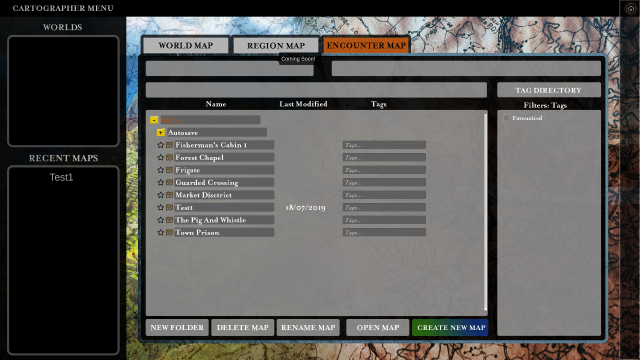 Alongside world maps, regional maps and encounter maps, I somewhat miss the astronomical-map scale and the city-map scale. We understand that this will create demand for many different packs later, at which point the total cost will no longer be cheap. In the UI design, we can see the aim is to make it easy to use now, with nice large tabs for the map types. But as demand arises for more scales and map types, more tabs will be needed, and eventually fitting them in will become harder. And beyond the scales I mentioned, there will certainly be demand for others.
Because I am quite sure some RPGs may also need maps of computer systems. Beyond near-future games, I can also imagine a present-day Call of Cthulhu game in which a few simple database schemas help when we want to see where and how a player intends to search for and analyse data, and so on. The "crime scene" maps I mentioned, relevant to investigative games, can be handled as encounter maps; they simply need different objects. The fact is that competing mapmaking programs may offer twenty or thirty substantially different options. An interface that is clear for newcomers, with few options during Early Access, is all very well. Everything is large enough; there is no hunting around. This approach made the iPhone great back in the day too. Yet nowadays more and more people say it has become the hardest mobile platform to use, and not because others took the same approach further.
Simply because as the options multiply, they no longer fit on one screen, and more things are hidden away behind extra button presses. I immediately have another example, though this one is not about tabs... I would like the walls to align with the grid, because drawing them with the mouse is a little awkward, and not everybody is that dexterous. On Discord, someone says pressing one of two keys on the keyboard—they are not sure which—would enable snap to grid. Modifiers such as snapping something to the grid, snapping it to another object and so on would need feedback too, which immediately complicates the interface; otherwise we are flying blind.
Clicking an object brings up a menu. It reminds me a little of The Sims' menu. But it is hard to expand, with little room for scrolling. Let us move on a little.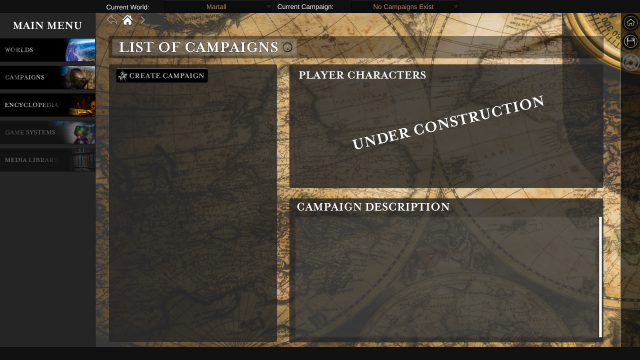
Managing the GM's campaign notes on this basis feels a little strange. I think of NBOS's The Keep, my own Access databases, or even the fact that Fantasy Grounds handles NPCs and data, with notes kept separate from the "encyclopaedia". The Keep's Inspiration Pad-style content generators and many other tools that help you keep track of gangs in a Shadowrun campaign, for example, are very useful once we are digitising our tabletop campaign.
The problem is not just that it cannot do this today, or that the design accommodates only a fairly limited number of functions. It is also that the default is fullscreen on both the DM's and the players' monitors, leaving little room or opportunity to see this and the GM's other applications at the same time. Even if we turn off fullscreen mode, the window remains a fixed size and cannot be arranged as part of a larger workspace. Despite offering only fixed resolutions, they have not managed to avoid wide black bars inside the window at certain resolutions, or to make the main menu fit even these few aspect ratios.
Everything is fine on a Full HD monitor in landscape orientation. What if our monitor is in portrait? Or ultrawide? A display that automatically adjusts to the resolution is hardly a new idea, and on that basis a resizable window that fits better into a workflow using several programs should be possible too. If the fixed window size leaves little usable space beside it, we can consider fullscreen almost compulsory. Without it, the program becomes uglier, but no more usable. It would be good to see resizing and support for all sorts of unusual resolutions, such as a portrait monitor. We hope this is only five minutes of development, but surprises may await us.
Either it should do everything so that external applications are unnecessary, or it should coexist easily with other applications. At least for the GM functions, it would be good if it fitted comfortably into smaller windows alongside other programs. But the structure and design we see now are not necessarily ideal for that either.
At present, many aspects of encounter management are hard to take advantage of, but sound effects, ambient audio and so on provide an interesting foundation. Yet anyone who says development will be cheaper because of the smaller team and simpler office is mistaken. Not just because economists talk about economies of scale, but because developing the same feature does not take fewer work hours, or less money, merely because nobody else is simultaneously working on an entirely unrelated feature or, say, a symbol set in another style.
If an additional development takes longer this way than it would with more people, you still have to pay the person throughout, while the competition also advances. The one fortunate thing is that other people can create content for programs like these, so the disadvantage in developer numbers may not necessarily be so bad if we count everyone developing content for the game that matters to us.